
Upgrading Amazon Linux – WHOA, what a journey!

[NOTE: It’s been over 6 months since I’ve posted, so I’m going to abbreviate this and continue later.]

Wow, what a path. This might be a LONG one, so sit back, pour a cup of covefe and read on.

I was trying to run something on my Amazon Linux instance but it wouldn’t update because the version of the OS is out of date. I did manage to run yum update and on my next login I saw this:
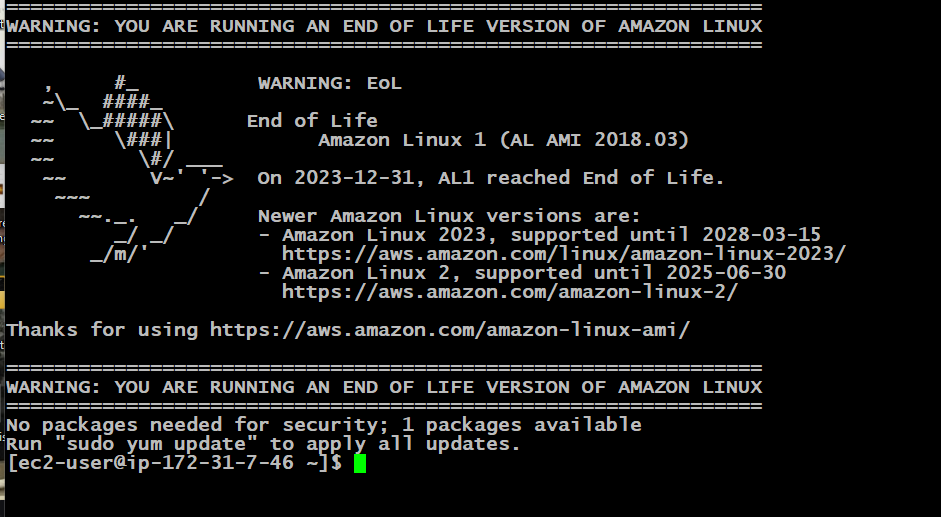
Warning from Amazon
Whoa – not what I expected

I had never seen this before. It also made me realize I have to upgrade or maybe just bring this site down.

Eventually I just figured “Oh well, time to upgrade” and spun up a new Amazon Linux 2023 instance and upgraded MySQL and PHP to the latest versions. Then I unpacked my WordPress instance, restored the database to a new one in MySQL and thought it would be a nice night, reading my lame site in all the updated glory. But of course, it all failed. My WordPress version was so out of date that it wouldn’t run on the latest versions of PHP and MySQL. What’s worse, I couldn’t upgrade the versions on my Amazon Linux instance as IT was so out of date that I couldn’t get even remotely current versions of MySQL and PHP. Oh bother…

Migrating the database to MySQL isn’t that hard – there aren’t any real routines in the stock WP database that requires a high version of MySQL. Porting the database over to a newer version of MySQL worked pretty easily. The problem was PHP (naturally).

To sum it up, running my current version of WordPress failed on the latest version of PHP (8.X). After going back several times and uttering many four letter words and curses, I decided to upgrade to Amazon Linux 2 and use all of the current versions on that platform. Further, since AL 2 was still current (at the time), this gave me time to figure out what I wanted to do.

Voila! AL 2 had PHP 7.X and it worked. Now I had some lead time. Regrettably, time has gotten away from me and it’s now October. AL 2 is now reached its EOL and I have to migrate to AL 2023 and port over everything all over again.

But before I work on that, let me get caught up on my C64 set up since I haven’t updated anything on that front in a while, either. My poor C64 is just collecting dust in the garage…


One quick break from the C64 journey

I’ll get back to the C64 restore job in a minute, but for now, one quick update.

It’s been a LONG time since I’ve had to manage this site, but tonight I ended up using MySQLdump to backup the database and tar for this site. It had been so long since I had done this I had to find the MySQL root password! Even so, it’s the first time on this PC that I used SFTP to download the backup files so I had to download and install WinSCP to do this.

I noticed MySQL needed more RAM and it was kind of lagging so I changed the buffer to a higher percentage of RAM on the system, and it has since started moving much quicker.

So far so good!

It’s been about 2 weeks since I started this instance, and it’s been running ever since. I haven’t caught a single error yet. I’m glad this cheaper instance is running well. Stay tuned!

Last post of 2024

So as 2024 draws to a close, it’s been a big year for me personally. It’s had its share of ups and downs, but I’m still hopeful for 2025.

Looks like my t2.micro instance is still running strong, guess that swap file did the trick!

Wishing you all a great happy new year!!

So now the t2.micro instance has taken over

My t2.small instance is now dead – looks like the bid price went up. Of course you can’t just up the bid price, you have to start all over again.

Luckily my t2.micro service started, but I had the same problem I’ve always had – after about 1-2 days, the database shuts off and I get an error saying “Error establishing database connection” and WordPress stops. A reboot fixes this issue.

So I tried a few things; First, I set up a crontab to restart mysql 4 times a day. I know this isn’t the right solution, but remember, people – I want this to be CHEAP.  That still didn’t work, tho’.

After some searching, I figured out that this instance has NO swap space. After enabling swap space it should run for a while now. Fingers crossed!!

Elastic IP is back on the menu

In Feb, 2024, AWS changed their policy on Elastic IPs. For those who don’t know, an Elastic IP is a static IP address that doesn’t change. You’ll get a static IP with every EC2 instance you run but it could change over time. An Elastic IP never changes so your Route 53/DNS records never change.

Starting in February, Elastic IP addresses will now incur a cost whether the instance is running or not (they used to not charge if you had the IP address but the instance was shut down).

However, if you have a running instance, you’re charged the same fee regardless. So I got an elastic IP and attached it to this instance since my plan is to run the site full time regardless.

I’m debating on whether or not I should get a verified SSL cert.

STOP! In the name of billing, before you break my pocketbook…

Okay, maybe you don’t get that reference, I’ll explain it at the end.

Lately I’ve been stopping my instance at night and restarting it in the day to keep costs down. But I’ve decided to stop doing that and just keep the site running regardless since the billing still won’t be THAT expensive.

I will also eventually set up an elastic IP since I’m already paying $0.005 an hour for a static IP, and an elastic IP is about the same cost. Might as way get one if the cost is, you know, the same…

Okay, the reference is from “STOP! In the name of Love!”, a song by the Supremes. Those Motown songs were the best.

The Supremes, 1966